


Calculating Amount/Concentration - Calibration Curve Fit Types: Cubic Fit - Tip281
Article number: 236679
OBJECTIVE or GOAL
With Empower, calculate Amount/Concentration, Calibration Curve fit types, and review Cubic Fit.
ENVIRONMENT
- Empower
- Empower Tip of the Week #281
PROCEDURE
STEP 1
For a Cubic Fit, Empower performs a least-squares fit of a cubic polynomial to the calibration points. A minimum of four points is necessary and six points are recommended (Figure 1).

STEP 2
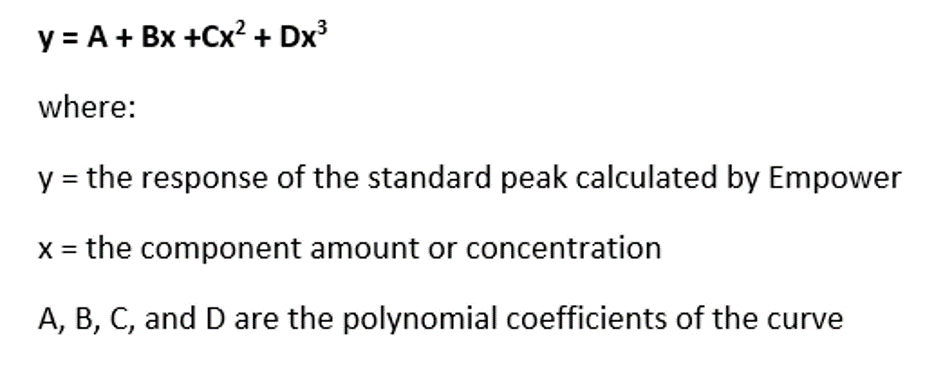
The Cubic Fit generates a Calibration Curve that is represented by the equation in Figure 2.
STEP 3
Calibration Curves can be accessed in various ways, for example:
- Review – bring a result into Review and click on the Calibration Curve tool
- Compare – right-click on a curve from the Curves tab in the project and select Compare
ADDITIONAL INFORMATION
This can be done with either the Pro or QuickStart interface.