


No fiber-optic communications; Beam Control Unit has no power on the AutoSpec - WKB48735
SYMPTOMS
- MassLynx takes a long time (several minutes) to boot
- Error message appears when MassLynx eventually starts:
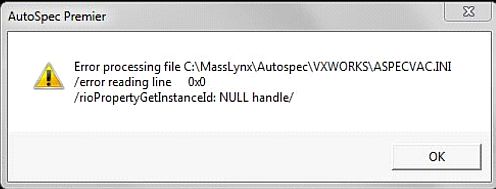
- No instrument control
ENVIRONMENT
- AutoSpec Premier (P)
- AutoSpec Ultima (M)
- MassLynx
CAUSE
Fault in instrument internal fiber-optic loop communications. Beam Control Unit is off with no power.
FIX or WORKAROUND
- Close MassLynx.
- Lock the system into "Standby" using the front panel Instrument Status Switch.
- Reboot the EPC and monitor boot progress by typing " PING EPC -t" into the Start/Run box.
- A command box opens and shows the ping responses during the boot.

- Wait up to 2 minutes until many responses show less than 1 ms to reply. (Indicates boot sequence has completed.)
- Close the Ping window.
- Run rioMainMenu to check the status of the instrument internal loop communications:
- Enter "TELNET EPC" into the Start/Run box.
- Telnet opens with a "->" prompt.
- Enter "rmm" followed by return in the Telnet window. (All characters should be specified in lower case.)
- The following appears:
***********************************
*
* RIO Main Menu
*
***********************************1. Shutdown RIO
2. Set Menu Size
3. Access subsystems
4. Lock All subsystems
5. Unlock All subsystems
6. Start Memory-Mapped Page Poll
7. Stop Memory-Mapped Page Poll
999. EXITchoice>
- Specify "3" into "choice" to display the units that are present on the Instrument Internal Loop communications path.
- The following appears:
choice> 3
***********************************
*
* Available subsystems
*
***********************************4. MA3481-200 Source Unit
6. MA3606 Source Unit
7. MA3779-200 PCI Card
999. EXITchoice>
- The above list of three "Subsystems" confirms a failure in the internal loop communications path.
- Specify "999" two or three times until "->" appears.
- Close the Telnet window
-
Remove the panel to expose the Beam Control Unit. This is located at the front of the instrument underneath the Magnet. (See the location diagram in "Additional Information".
- Confirm that the "Standby" power switch on the front of the Beam Control Unit is illuminated.
- If no illumination is seen, check FS1.
- Power-off the Beam Control Unit "Standby" Power switch. Set it to position "0".
- Power-off the "Bench" Circuit Breaker located on the Main Distribution Unit located at the front of the instrument underneath the GC.
- See the location diagram in "Additional Information".
- Remove FS1 with the aid of a small coin or large slotted screwdriver.
- Inspect the fuse for visible burning, or use a digital voltmeter.
- Open Circuit, infinite or very high resistance, indicates a failed fuse.
- Replace the fuse with the identical item (1340141-S - FUSE GLASS 1.25A 20MM A/S)
- Power-on the "Bench" circuit breaker.
- Set the Beam Control Unit "Standby" Switch to the On, "1" position.
- Check for illumination in the "Standby" switch.
- Note that the "Operate" Switch shows no illumination
- Check the power cable for 240V AC. If no power, check the power strip located underneath Magnet that 240V AC is being supplied to it.
- If Yes, check the fuse within the strip
- If No, check FS3 in AC Distribution unit.
- Restart the EPC and, as above, monitor the boot progress via "PIN EPC -t", closing the window when complete.
- Run rioMainMenu to recheck the status of the instrument internal loop communications:
- Specify "TELNET EPC" in the Start/Run box.
- Telnet opens with a "->" prompt.
- Specify "rmm" followed by return in the Telnet window. (All characters should be entered in lower case.)
- The following appears:
***********************************
*
* RIO Main Menu
*
***********************************1. Shutdown RIO
2. Set Menu Size
3. Access subsystems
4. Lock All subsystems
5. Unlock All subsystems
6. Start Memory-Mapped Page Poll
7. Stop Memory-Mapped Page Poll
999. EXITchoice>
- Enter "3" into "choice" to check which units are present on the Instrument Internal Loop communications path.
- The following will be displayed:
choice> 3
***********************************
*
* Available subsystems
*
***********************************1. MA3445 Beam Unit
2. MA3458 Heater Unit
3. MA3481-201 Source Unit
4. MA3481-200 Source Unit
5. MA3515 Vacuum Unit
6. MA3606 Source Unit
7. MA3779-200 PCI Card
999. EXITchoice>
- This list of the seven "Subsystems" present confirms good internal loop communications.
- Specify "999" two or three times until the "->" appears.
- Close the Telnet window.
- Start MassLynx, which will boot normally.
- Refit any removed instrument panels.
- In the tuning window, check the Solenoid Slit Settings if applicable. These may have reverted to default values. Re-specify the values from a saved copy.
- Restart the Magnet.
- The system is now fully operational. The Instrument Status switch may be set to Operate.
ADDITIONAL INFORMATION
