


How to load firmware manually via "Loader.exe" - WKB259491
Article number: 259491
OBJECTIVE or GOAL
Load firmware manually via "Loader.exe".
ENVIRONMENT
- Empower 3
- MassLynx
- ACQUITY APC
- ACQUITY APC Isocratic Solvent Manager
- ACQUITY APC Sample Manager - FTN
- ACQUITY Arc
- ACQUITY Arc Premier
- ACQUITY Arc Sample Manager FTN-R
- ACQUITY UPLC
- ACQUITY UPLC BSM
- ACQUITY UPLC Column Manager
- ACQUITY UPLC H-Class
- ACQUITY UPLC H-Class Bio
- ACQUITY UPLC H-Class Quaternary Solvent Manager (QSM)
- ACQUITY UPLC H-Class Bio Quaternary Solvent Manager (QSM)
- ACQUITY UPLC H-Class Plus Quaternary Solvent Manager (QSM)
- ACQUITY UPLC H-Class Plus Bio Quaternary Solvent Manager (QSM)
- ACQUITY UPLC I-Class
- ACQUITY UPLC H-Class PLUS
- ACQUITY UPLC H-Class PLUS Bio
- ACQUITY UPLC I-Class PLUS
- ACQUITY UPLC M-Class
- nanoACQUITY UPLC
- PATROL UPLC Process Analysis System
- ACQUITY UPLC Process Sample Manager
- ACQUITY UPLC PDA Detector
- ACQUITY UPLC Sample Manager
- ACQUITY UPLC Sample Manager - Flow Through Needle PLUS (SM-FTN PLUS)
- ACQUITY UPLC Sample Organizer
- ACQUITY UPLC Tunable UV Detector
- ACQUITY UPLC FLR Detector
- ACQUITY UPLC RI Detector
- ACQUITY Premier System
- 2414 Refractive Index Detector
- 2424 Evaporative Light Scattering Detector
- 2475 Multi-Wavelength Fluorescence Detector
- 2489 UV/Vis Detector
- 2998 Photodiode Array Detector
- ACQUITY UPLC Tunable UV Detector
- ACQUITY UPLC PDA Detector
- ACQUITY UPLC PDA eλ Detector
- ACQUITY UPLC FLR Detector
- ACQUITY UPLC ELS Detector
PROCEDURE
- Find and open the "loader.exe" file located in the firmware folder.
- Masslynx: C:\Program Files (x86)\Waters Instruments\Firmware
- Empower: C:\Empower\Waters Instruments\Firmware
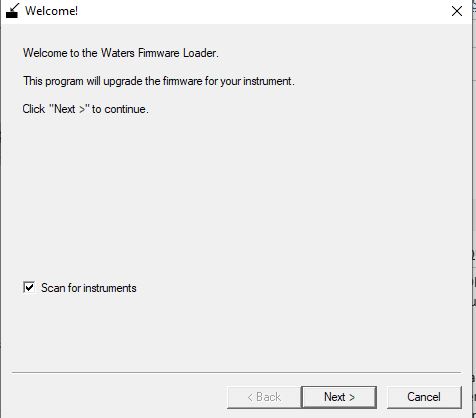
2. Select the "Scan for instruments" check box.
3. Locate the instrument for which you want to manually change the firmware (or CPU2000 when blank).
4. Browse for the specific .sft file you want to load.
5. Select Load and wait for it to complete; do not power cycle the module until directed to do so.
ADDITIONAL INFORMATION