


ACQUITY console shows incorrect modules in Chromeleon - WKB320774
Article number: 320774
SYMPTOMS
- ACQUITY console shows incorrect modules for the system
- Top-left of the console shows LOCAL, not the expected system and node names, "Console for System [name] on Node [name]"
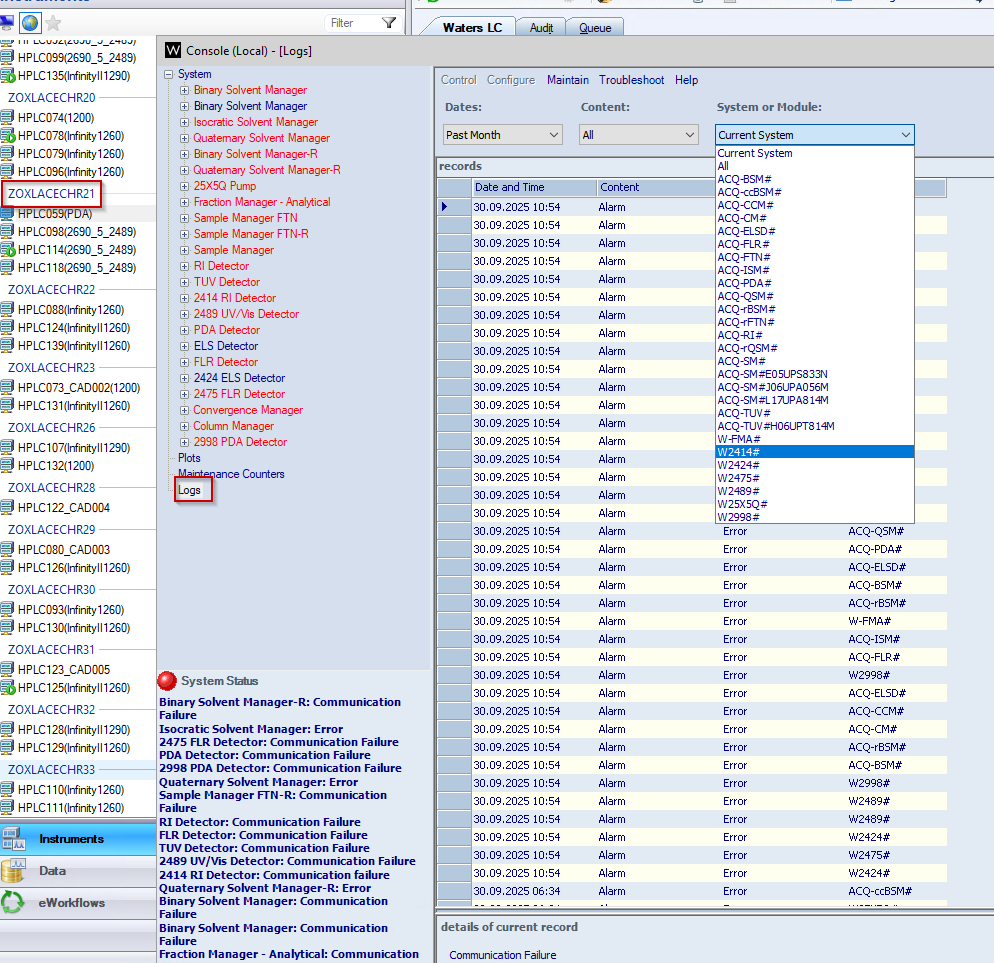.png?revision=1)
ENVIRONMENT
- Chromeleon 7.3.2
- ACQUITY Console
- Waters DP2022
- Waters LC Analytical Support Layer 3.0.0 for Thermo CDS
CAUSE
When a user closes Chromeleon, they are not automatically releasing control of that instrument. The next user connecting to the system shows the local console of the node they are connected from (for example, Citrix), which then shows unconnected or unexpected modules that are flagged red.
FIX or WORKAROUND
- Open Chromeleon.
- Connect to the system.
- Click TAKE CONTROL.
- If hovering shows someone has control, the console shows LOCAL.
- Close the console if open.
- Click RELEASE CONTROL.
- Close Chromeleon.
- Open Chromeleon.
- Connect system.
- Click TAKE CONTROL.
- Launch the console.
 Correctly displayed console showing "Console for System [name] on Node [name]"
ADDITIONAL INFORMATION
CRI-8422 is fixed in Waters LC Analytical Support Layer 3.1.0 for Thermo CDS.
Waters Thermo CDS Support Layer 3.1 will be tested onlywith DP2024. The recommendation is to use DP2024 when moving to the Thermo CDS v3.1 support layer.