


Prior to Empower 3 FR4 SR3, user could delete System and Node - WKB260784
Article number: 260784
SYMPTOMS
- Users could delete System and Node in Empower versions prior to FR4 SR3
- Node access given to All users with Owner, Group, and World
ENVIRONMENT
- Empower versions prior to Empower 3 FR4 SR3
CAUSE
There are no privileges to control the deletion of system and nodes. Node access is set to Owner, Group, and World, so users could delete the system and node from Empower.
FIX or WORKAROUND
Set Node access to Owner Only or Owner and Group, so users cannot delete the system and node.

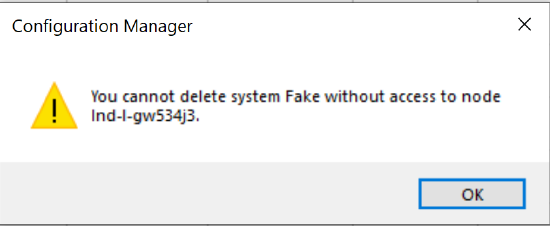
Note: After changing the node access, users will not be able to take system offline and bring online. Even though users have no access to node, the delete option may still be displayed, but when user tries to delete the node or system, the following message appears:
ADDITIONAL INFORMATION
From Empower 3 FR4 SR3, new and more granular user privileges were introduced for tighter compliance. Find the following privileges related to Node and System from SR3:
- Create System
- Alter System
- Delete System
- Bring System Online
- Take System Offline
- Create Node
- Alter Node
- Delete Node