


How do I get to the ACQUITY Console from Empower? - WKB1420
Article number: 1420
ENVIRONMENT
Empower, Driver Pack 4.
ANSWER
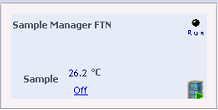
You now access the ACQUITY Console in Empower from a new icon on the Sample Manager console in Run Samples that looks like an instrument stack with a green triangle. In the previous (June 2011) driver pack, the icon incorporated the letter A. You can also "right-click" ane select "Show Console" from the menu from any of the UPLC module consoles in Run Samples.
ADDITIONAL INFORMATION
id1420, EMP2LIC, EMP2OPT, EMP2SW, EMP3GC, EMP3LIC, EMP3OPT, EMP3SW, EMPGC, EMPGPC, EMPLIC, EMPOWER2, EMPOWER3, EMPSW, SUP