Why do I not see the folder C:\ProgramData? - WKB319111
ENVIRONMENT
- ASTRA
- DYNAMICS
- Windows 10
ANSWER
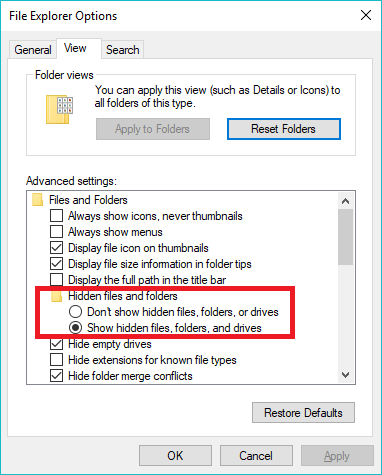
The folder C:\ProgramData is hidden by default in Windows, which is why it may not be visible. ASTRA stores its log files and other data in C:\%allusersprofile%\WTC\ASTRA\7.x, typically translating to C:\ProgramData\WTC\ASTRA\7.x. To access it, you must enable the option to show hidden files in File Explorer Options. This setting can be found by searching for “folder” in Windows 10 or navigating through Control Panel > Appearance and Personalization > File Explorer Options. When “Show hidden files, folders, and drives” is selected, the ProgramData folder becomes visible.
ADDITIONAL INFORMATION
ASTRA stores log files and other program data in the folder C:\%allusersprofile%\WTC\ASTRA\7.x which usually translates to C:\ProgramData\WTC\ASTRA\7.x.
This folder is usually hidden on Windows so that it cannot be deleted accidentally. To unhide this folder so that you can access ASTRA and DYNAMICS program data:
1. Go to File Explorer Options, found in Windows 10 by typing "folder' in the search bar. You can also access it via Control Panel > Appearance and Personalization > File Explorer Options.
2.) Select the option "Show hidden files, folders, and drives".