


How to set instrument temperature from ASTRA - WKB319068
OBJECTIVE or GOAL
Set the instrument temperature from ASTRA software using Script Collection, enabling automation and temperature control within experimental sequences.
ENVIRONMENT
- Software: ASTRA
- Instruments:
- MALS (multi-angle light scattering)
- Optilab
- ViscoStar
PROCEDURE
Switch ASTRA to Experiment Builder mode via System Preferences. Create a new experiment using Script Collection with a method appropriate for your instrument (for example, Calibration for MALS, Purge On for Optilab, solvent exchange for ViscoStar). Remove unnecessary procedures and insert the provided script, modifying ramp rate and temperature as needed. Replace instrument identifiers in the script based on the instrument used (for example, LSInstrument for MALS, RIInstrument for Optilab). Adjust the collection duration to allow for temperature equilibration before the experiment ends.
ADDITIONAL INFORMATION
When operating at temperatures other than room temperature, users typically set the temperature from the front panel of the instrument. However, if you want to automate experiments or set a temperature in a sequence, it is convenient to use a method that will set the temperature.
*** Note: The Temperature control in the instrument profile does NOT actually set the temperature on the instrument. ***
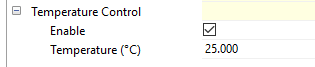
To set the temperature, use Script Collection, which can send commands directly to the instrument. (Most Astra methods use Basic Collection instead of Script Collection.)
Here are the steps to create a custom method:
1. Switch to Experiment Builder mode (System > Preferences).
2. Create a new experiment from a method that uses your instrument and Script Collection. For MALS, use Calibration. For an Optilab, use Purge On. For a ViscoStar, use a solvent exchange method.
3. You may want to delete any other procedures besides Script Collection, such as Peaks.
4. Replace the text with the text below. Items you may want to modify are in blue.
5. The first two lines can be modified with ramp rate and temperature.
6. In this example, the temperature is being set on a MALS. If you are using an Optilab, replace LSInstrument with RIInstrument. For a ViscoStar, replace LSInstrument with VIInstrument.
7. This collects for 10 seconds, in the SetDuration command. This will NOT wait until the temperature has been reached. If you estimate the equilibration time you can extend the duration such that when the experiment completes the instrument has reached the target temperature.
8. Anything that follows "--" on the same line will be treated as a comment.
--Code begins here
rate = 0 -- maximum ramp rate; units are degrees / sectemp = 37.0
Inst = LSInstrument.Create ()Inst:StartCollection ()
Collection.PromptUser ("Press Enter to Start Calibration.");Collection.Start()
Inst:SendCommand("SetTemperature 0 " .. temp .. " " .. rate)
Collection.SetDuration(10000)Collection.Stop()